ZodyaxPro
Features
The program's screen, core tools, help and outputs. Every fact is taken from the program's own files.
At a glance
- The program works offline: calculations, ephemeris, the Library and the logo are inside your computer.
- Turkish, English and Arabic come in one package; the language changes instantly with one click. All three languages are open in every licence.
- In Arabic mode the page layout turns right-to-left; the wheel, the 90° dial, chart axes, degrees and dates are not mirrored.
- The Arabic fonts are built into the program; no internet is needed.
- The program opens no internet address other than the ZodyaxPro and ZodyaxTech websites.
Get to know the screen
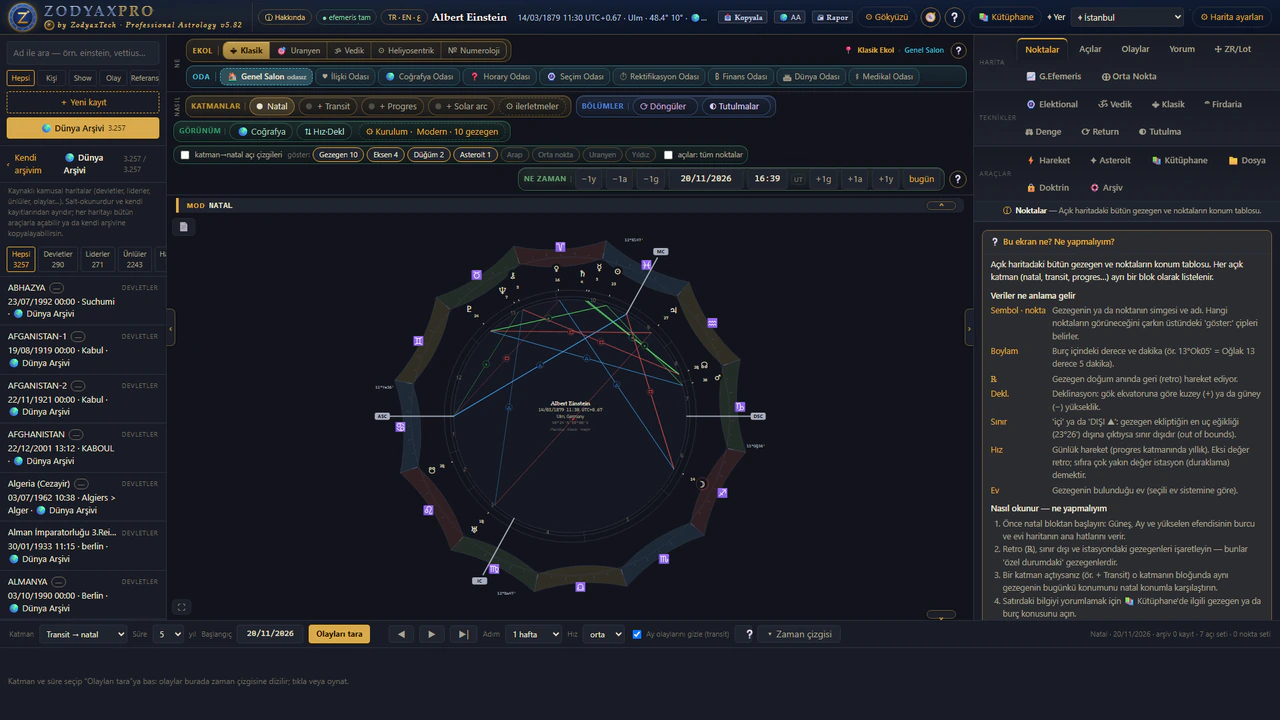
The program's usage tour introduces the screen in 6 steps:
Choose a person
Search the archive on the left by name and click a person; the chart opens for them. '+ New record' adds a new person.
The wheel
The selected person's chart: signs on the outer ring, houses and planets inside, aspect lines in the middle. The left horizontal line is the Ascendant, the top vertical line the MC. The ⛶ in the bottom-left corner is focus mode: the panels slide away and the chart fills the window (Esc returns); the thin handles on the edges close the panels one by one.
Layers and date
Open + Transit, progressions and the other sections here; move time with the date bar. The ❔ on the right explains this bar in detail.
School and room
In the top band the SCHOOL box chooses the tradition (Classical, Uranian, Vedic, Heliocentric, Numerology) and the ROOM box the subject you work on: the Main Hall and 8 rooms (Relationship, Locational, Horary, Electional, Rectification, Financial, Mundane, Medical). The location line shows both; in each room the 🎓 Guide explains the method step by step.
Right panel
The chart's data and the tools are in tabs. The ❔ box at the top of each tab explains what that screen shows and what you should do.
Library
Topics, reading and search: astrology topics from the foundation path to advanced techniques. To see this tour again, press the 🧭 button in the top bar.
Help on every screen
The program has ⓘ help boxes for 77 screens. Each box explains, in three languages, what the screen shows, its data, how to use it step by step and what to watch out for.
Core tools
20 core screens that are also used in the rooms. Tap a title to open the program's own description.
Points
The position table of every planet and point in the open chart. Each open layer (natal, transit, progressed…) is listed as its own block.
Aspects
The list of aspects in the open chart: natal aspects and the aspects each open layer makes to the natal points. The 'Aspect set' in the top bar decides which aspects count.
Events
The result of the timeline scan: the exact aspects the selected layer (transit, progressed, solar arc…) makes to the natal points during the selected period, in date order.
Reading
Reading cards for the strongest effects the open layers (transit, progressed, solar arc…) make to the natal chart, in time order. If only the natal chart is open, you are asked to open a layer first.
Return
Return charts: the moments a planet comes back to its birth position, and the charts cast for those moments. The solar return gives the theme of the year, the lunar return the theme of the month; returns of the slow planets show long cycles.
Eclipses
A list of solar and lunar eclipses, new moons, full moons and quarters. These are sky events independent of any person; if a person is selected, each event's natal house and its contacts to natal points are also shown.
Speed·Decl
The Speed·Declination card beside the wheel: the speed and declination of the planets in the open chart (natal or sky), as a number plus a worded status badge; the element distribution below. Toggled with the '⇅ Speed·Dec' button; hover a badge for its explanation.
ZR/Lots
Zodiacal Releasing (Valens): period lords that start from the Lot of Spirit or Fortune and move through the signs. The positions of the Hermetic lots are at the top; the Arabic parts set table is below.
Graph.Eph
Graphic ephemeris: the motion of the transiting planets over the chosen period, together with the natal points in one chart. The modulus choice (45°, 90°, 360°) folds the aspects on top of each other.
Midpoints
Midpoint trees (Ebertin / Uranian tradition): the pairs whose exact midpoint falls on each planet. The notation 'X = A/B' says that X carries the combined meaning of A and B.
Classical
Classical (traditional) assessment: the chart's sect, the lords of the day and hour, the Moon's condition, the essential dignity table, mutual receptions, one-way receptions and, at the bottom, the ⚜ Almuten Library.
Firdaria
Firdaria: the period lords of the Persian tradition. Life is divided into a 75-year cycle of major periods ruled by the planets in turn, each with seven sub-periods. A day chart starts from the Sun, a night chart from the Moon.
Balance
The overall balance of the chart: elements, modalities, polarity, quadrants, hemispheres and aspect patterns. Three counting methods can be chosen at the top.
Motion
⚡ Motion Studio: the planets' speed, retrograde phases, shadow periods, declination and parallels, in six sub-tabs.
Asteroids
✦ Asteroids tab: every asteroid, centaur and trans-Neptunian object (Eris, Sedna…) in the program in one list — cluster filter, ephemeris file present/missing status, position·house·declination for the selected person, keyword and source code. The 'show on wheel' box adds the asteroid to the wheel, to the Points/Aspects lists and to the open layers.
Points & Setup drawer
The ⚙ Points & Setup drawer: you save which points appear on the chart (planets, asteroids, nodes, Arabic parts, midpoints, stars), which aspects are drawn with which orbs, and the house system as ONE SETUP. The selected setup applies to the whole wheel, the tables and the scans.
Timeline
The timeline at the bottom: it shows on a date axis the exact aspects the selected layer (progressed, solar arc, transit) makes to natal points during the selected period, and lets you play through time.
File
Client file: sessions and notes linked to the selected person, saved views and period report generation. Records are tied to the person and reachable from every room.
Doctrine
Doctrine approval centre: the approval record of the astrological rule tables the program uses (orbs, dignity tables, interpretation texts, library batches…). Each item is approved with the fingerprint of its content; if the content changes, the approval drops by itself.
Archive
Archive and maintenance: the state of the person archive, backups, the period report engine connection, the data check and the system diagnosis.
Outputs
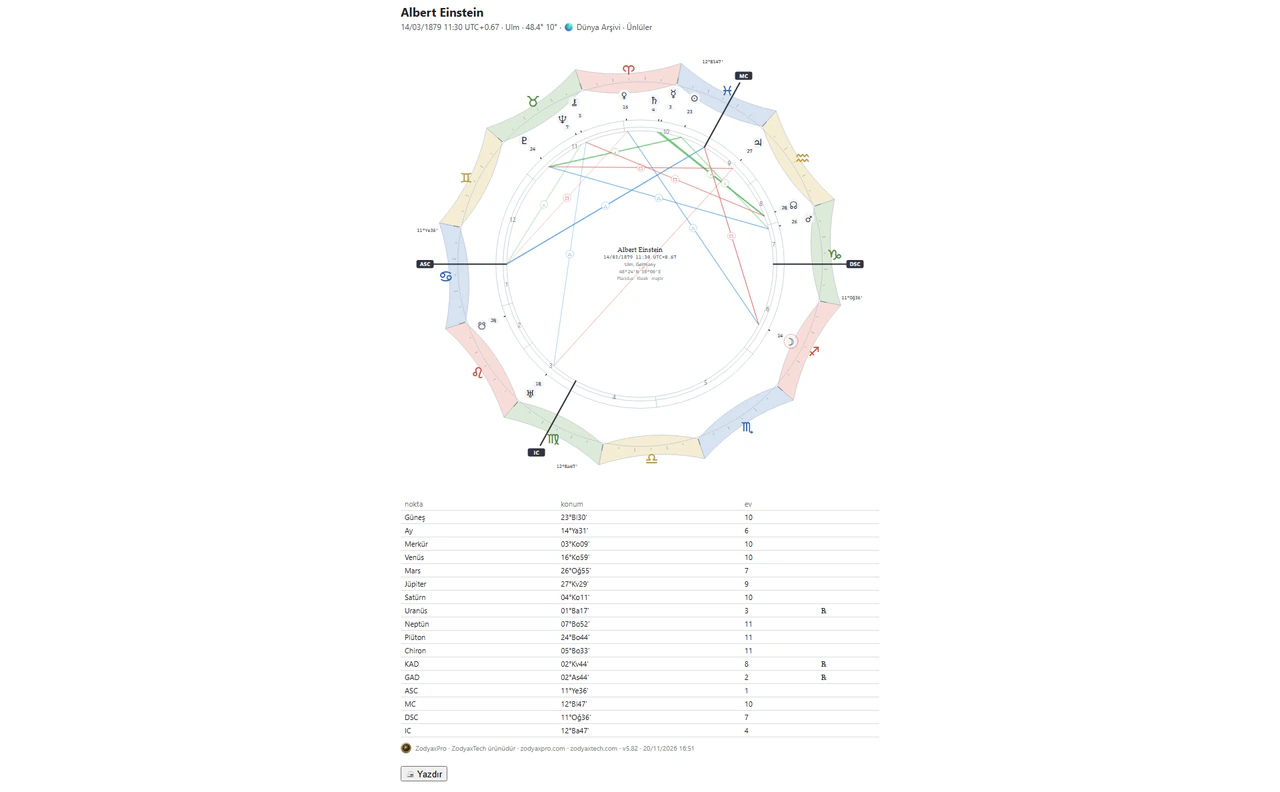
- Chart output: the wheel and the tables are saved in a single file that opens on its own and prints on A4.
- The chart output can be taken in Turkish, English or Arabic; the Arabic output is laid out right-to-left with an embedded font.
- Birth report: planet positions, house cusps, element balance, aspect patterns, essential dignities, mutual receptions and time lords (firdaria, Vimshottari) in one report; prints on A4.
- The birth report is prepared in Turkish and English.
- The footer of every output carries a small ZodyaxTech logo with the zodyaxpro.com and zodyaxtech.com addresses.
System requirements
- At least 4 GB of RAM
- About 500 MB of free disk space for installation
- A screen of 1366×768 or larger
- Calculations run on your computer; the internet is needed only to download the installer and for the live lessons
- A single-file installer; no other program needs to be installed
- There is no official installation for Mac or Linux
- Windows 10 or 11 (64-bit)
Explore more
Rooms
Rooms for each field of use, with their toolkits.
Schools
Calculation frames and which school opens in which room.
Library
Shelves, search and the rooms' step-by-step guides.
World Archive
The archive of public charts that comes with the program.
Training
The curriculum and format of the live course.
The information on this page is taken from the ZodyaxPro program's own files.
ZodyaxPro + Training
The program and a 4-month live training together
Purchase options are on our official sales portal.
Purchases are made through our official sales portal, ezoterikmarket.net. This site does not sell anything.